Social media image sizes: the 2026 cheat sheet
The social media post sizes that cover most needs are: 1080 × 1350 (4:5) for feed posts on Instagram, Facebook, LinkedIn and Threads; 1080 × 1920 (9:16) for Stories, Reels, TikTok and YouTube Shorts; 1000 × 1500 (2:3) for Pinterest; and 1920 × 1080 (16:9) or 1080 × 1080 (1:1) for X.
Profile and cover images are where platforms differ most. The table below has each one, with where the number comes from.
Post and story sizes
| Platform | Feed post | Story / vertical video | Notes |
|---|---|---|---|
| 1080 × 1350 (4:5); square 1080 × 1080 | 1080 × 1920 (9:16) | Profile grid shows a 3:4 crop | |
| 1080 × 1350 (4:5) | 1080 × 1920 (9:16) | Meta’s ads guide asks for 1440 × 1800 | |
| 1080 wide, 4:5 or 1:1 | – | Accepts 3:1 to 4:5; up to 20 photos | |
| X | 1920 × 1080 (16:9) or 1080 × 1080 | – | Tall images cropped in the timeline; 4 per post |
| Threads | 1080 × 1350 (4:5) or 1:1 | – | Very tall images allowed via the API |
| TikTok | 1080 × 1920 photo post | 1080 × 1920 (9:16) | Up to 35 photos via the API |
| YouTube | 1920 × 1080 video | 1080 × 1920 Shorts | Shorts up to 3 minutes |
| 1000 × 1500 (2:3) | 9:16 video Pins | Pinterest Help recommends 2:3 |
For the detail on each, see Instagram post size, Instagram Story size, Instagram Reel size, TikTok video size and YouTube Shorts size.
Profile and cover sizes
| Platform | Profile picture | Cover / banner | Source |
|---|---|---|---|
| Square, 320 × 320 or larger; shown as a circle | None | Instagram publishes no profile size | |
| Facebook Page | 320 × 320 | 851 × 315 loads fastest; at least 400 × 150 | Facebook Help |
| LinkedIn profile | 400 × 400 (widely used) | 1584 × 396, under 8 MB | LinkedIn Help for the cover |
| LinkedIn Page | Logo 400 × 400 (min 268 × 268) | 1512 × 256, under 3 MB | LinkedIn Help |
| X | 400 × 400 | 1500 × 500 | X Help Center |
| YouTube | Shown at 98 × 98; under 15 MB | 2048 × 1152 minimum, 2560 × 1440 recommended; safe area 1235 × 338; 6 MB or less | YouTube Help |
| YouTube thumbnail | 3840 × 2160 recommended (1280 × 720 still works) | Shorts: 2160 × 3840 | YouTube Help |
| TikTok, Threads, Pinterest | Square, shown as a circle | None for TikTok and Threads | No published size |
Last checked November 2026. Where a platform publishes no size, we say so rather than guess. The LinkedIn profile photo figure is widely used but was not on the LinkedIn help page we checked. X’s help centre blocks automated checks, so its figures come from its published article as shown in search.
Where the conflicting numbers come from
- YouTube thumbnails. Most guides say 1280 × 720. YouTube now recommends 3840 × 2160 with a minimum width of 640. Both are 16:9, so a 1280 × 720 thumbnail still uploads; YouTube simply asks for more.
- Facebook covers. Facebook’s help page recommends an 851 × 315 file, but shows the cover at 16:9 on a computer and 2.4:1 on a phone, both left-aligned. Keep words and faces in the centre; on phones the Page’s profile picture also overlaps the cover by about 40 px.
- LinkedIn Page covers. Older guides say 1128 × 191. LinkedIn’s help page now says 1512 × 256.
- App versus API. Instagram’s app accepts 3:4 posts, but Meta’s publishing API, which scheduling tools use, stops at 4:5.
One crop for everything
You do not need eight versions of every image. Three masters cover almost everything:
- A 1080 × 1920 (9:16) master for Stories, Reels, TikTok and Shorts. Keep everything important inside the middle 1080 × 1350 band.
- Crop that band out for a 4:5 feed post on Instagram, Facebook, LinkedIn and Threads, and the centre 1080 × 1080 if you need a square for X.
- A separate 16:9 original for X, YouTube thumbnails and covers. A landscape crop from a vertical master is too thin to use.
Keep text and logos tighter still, about 65 px in from each side and out of the top 14% and bottom 35% of the 9:16 frame, so they clear Story and Reel buttons. The full method, with pixel positions, is in the best aspect ratio for social media.
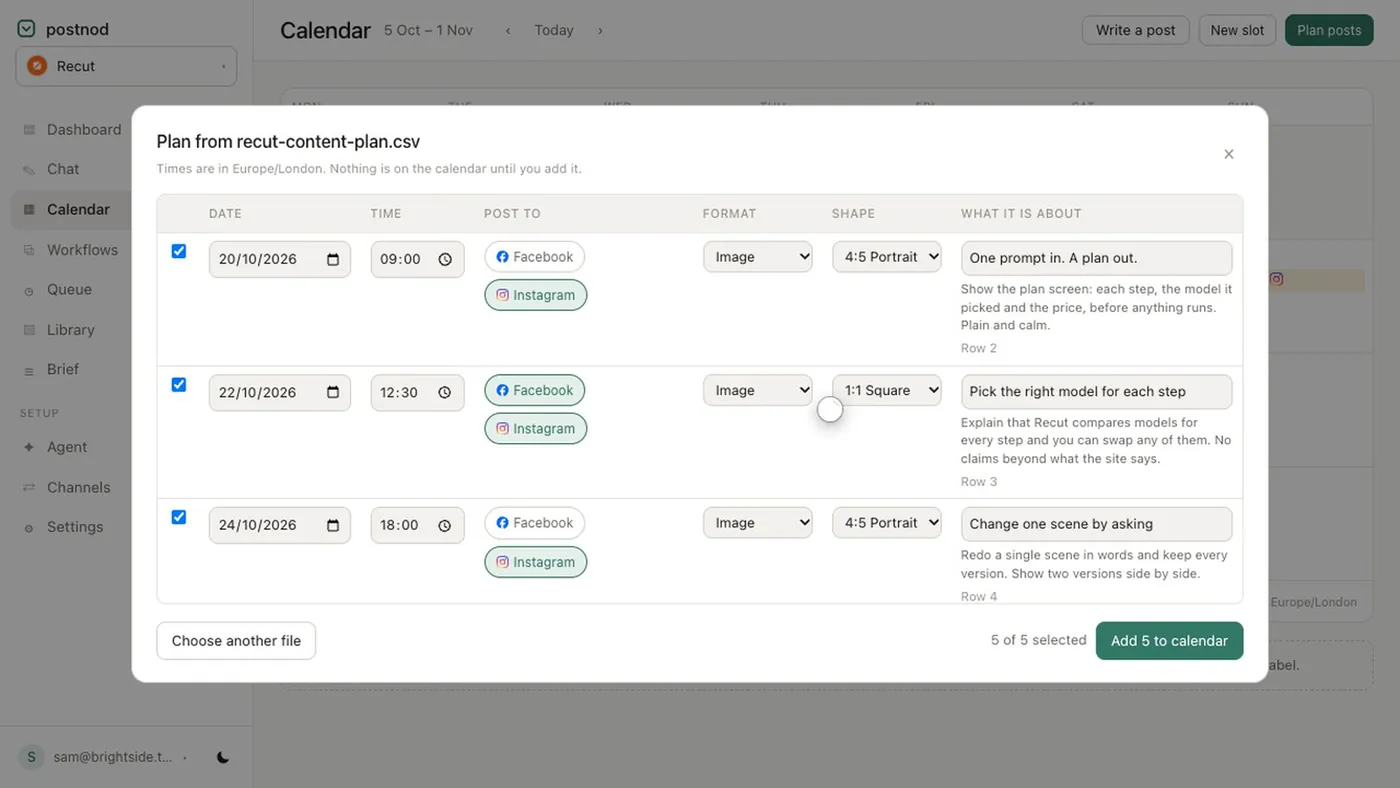
Postnod helps here by putting the shape in the plan. Each post in an imported plan carries its format (portrait, square, story, reel), the agent makes the image at that ratio, and the post is checked against each platform it is going to before it is staged. A ratio a platform would crop is flagged then, not after it goes out.
File checklist
- Export feed images 1080 px wide. Instagram scales anything wider down to 1,080.
- Name files by ratio (spring-offer-4x5.jpg, spring-offer-9x16.jpg) so the right one goes to the right place.
- Save profile pictures square with the subject centred; most platforms show them as a circle.
- Check covers on a phone and a computer: both crop them differently.
- Check character counts too: social media character limits.
Questions people ask
What is the best image size for all social media?
No single size fits every platform without cropping. A 1080 × 1350 (4:5) image covers most feeds, and a 1080 × 1920 (9:16) version covers Stories, Reels, TikTok and Shorts.
What size should a social media post be?
1080 × 1350 pixels for feed posts on Instagram, Facebook, LinkedIn and Threads. Use 1000 × 1500 for Pinterest and 1920 × 1080 or 1080 × 1080 for X.
What size is a YouTube thumbnail?
YouTube now recommends 3840 × 2160 (16:9), with a minimum width of 640. The long-standing 1280 × 720 still works because it has the same shape.
What size is a Facebook cover photo?
Facebook recommends an 851 × 315 file, at least 400 × 150. It shows the cover at 16:9 on computers and 2.4:1 on phones, so keep the important part in the centre.
What size is a LinkedIn banner?
1584 × 396 for a personal profile, under 8 MB, and 1512 × 256 for a company Page cover, under 3 MB.
Try it on one brand
Postnod reads your website, drafts posts in your brand’s voice, checks them against your rules and waits for your nod. Nothing is posted until a person approves it. Free for one brand.
Related guides
Sizes and character limitsBest aspect ratio for social media: one table, every placement Sizes and character limitsInstagram post size: the dimensions for every format
 Sizes and character limitsSocial media character limits: every platform in one tableSizes and character limitsInstagram Story size: 1080 × 1920, and where not to put text